Password Recovery Software: Understand, Use, Protect
Article written in partnership with PASS REVELATOR. If password security interests you and you want to learn more, we invite you to visit their site: https://www.passwordrevelator.net
Bank accounts, social networks, professional messaging, cloud spaces, health apps: every service requires its own credentials. On average, a user today manages between 70 and 100 different passwords. Faced with this proliferation, remembering every combination is a mnemonic feat.
But what happens when you lose access to a vital account? An urgent professional document locked in a protected file, a computer whose session password you have forgotten, or lost login credentials can paralyze daily activity. Frustration is immediate, and the consequences can sometimes be serious.
It is in this context that password recovery software presents itself as a potential solution. These tools promise to restore access to your own systems and files. Yet their existence raises a fundamental question: how do these programs sit between legitimate assistance and security risk?
This article explores in depth the universe of password recovery software. We will examine how it works, the different types that exist, legitimate uses, as well as the risks they represent and how to protect yourself effectively.
What Is Password Recovery Software?
Definition and main purpose
Password recovery software is a computer program designed to help users recover lost or forgotten passwords. Contrary to the image one might have, these tools do not necessarily "crack" passwords in the traditional sense. Their approach varies considerably depending on the context and the method used.
The main goal of these programs is to restore access to legitimate digital resources when credentials have been lost. They can act on operating systems, applications, protected files, or network connections.
Recovery vs. cracking: an essential distinction
It is crucial to understand the difference between "recovering" and "cracking" a password:
Recovery generally consists of extracting passwords already stored on a system, often in encrypted or hashed form. The software exploits how the application or operating system stores this information. For example, web browsers store saved passwords in a local database. Recovery software can access and decode them, provided it has system access rights.
Cracking, on the other hand, involves forcing a password through methods such as brute force (testing every possible combination) or a dictionary attack (testing common passwords). These techniques do not require prior access to stored data, but they need time and computing power.
Most recovery software combines these two approaches depending on the situation. Do these tools really "break" encryption? Not always. Often, they exploit flaws in the security implementation or recover decryption keys already present on the system.
Different Types of Recovery Software

The ecosystem of password recovery software is vast and diverse. Each category targets specific types of credentials and uses adapted techniques.
Software for operating systems
These tools focus on passwords managed directly by Windows, macOS, or Linux.
What do they recover?
- User session passwords
- Saved Wi-Fi credentials
- Passwords stored in the system credential manager
- Disk encryption keys (in some cases)
How do they work?
Operating systems store passwords in hashed form (Windows uses NTLM or Kerberos, for example). Recovery software can extract these hashes from RAM or the system registry, then try to reverse them or compare them against databases of known hashes. On Windows, tools such as Ophcrack or Kon-Boot can bypass or recover session passwords.
Software for specific applications
This category groups tools that target particular software that stores credentials.
Web browsers: Chrome, Firefox, Edge, and other browsers offer to remember passwords. This data is stored locally, sometimes encrypted with a key derived from the session password. Programs such as WebBrowserPassView or ChromePass can extract this information if the user has system access.
Email clients: Outlook, Thunderbird, and other messaging clients keep passwords for configured accounts. Recovery software can read configuration files to retrieve these credentials.
FTP/SSH clients: FileZilla, WinSCP, and other file-transfer tools often store server connection credentials. This data can be extracted by specialized programs.
Protected files and documents: ZIP, RAR, PDF files, or Office documents can be password-protected. Recovery software then uses brute-force or dictionary techniques to try to guess the password. Tools such as John the Ripper or Hashcat are particularly effective for this type of task.
Software for Wi-Fi networks
These tools aim to recover wireless network security keys.
What do they recover?
WEP, WPA, and WPA2 keys of Wi-Fi networks the computer has already connected to.
Legitimate uses:
- Recover your own forgotten Wi-Fi key
- Perform a security audit of your home or professional network
- Test the robustness of a security protocol
Programs such as WirelessKeyView (Windows) or system commands on macOS and Linux can extract locally stored Wi-Fi passwords.
Other categories
Other tools exist for more specific needs:
- BIOS/UEFI passwords: to access a computer locked at the hardware level
- Databases: to recover passwords from SQL, MongoDB, and similar systems
- Mobile applications: to extract credentials stored on smartphones
Technical Methods Used
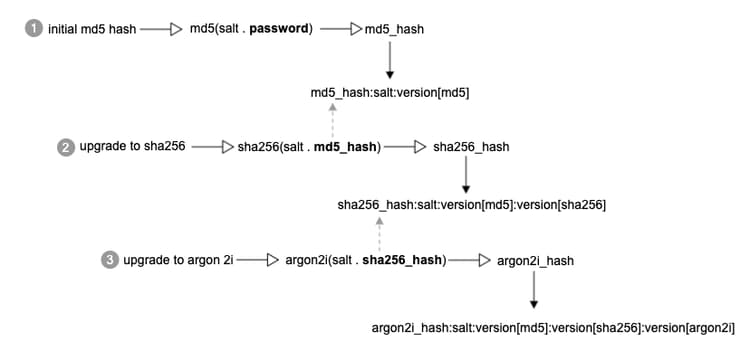
To better understand how this software works, let us examine the main techniques used:
Hash extraction
Modern systems do not store passwords in plain text, but as "hashes" (cryptographic fingerprints). Recovery software can extract these hashes and try to reverse them by comparing them with precomputed tables (rainbow tables) or by testing combinations.
Exploitation of vulnerabilities
Some programs take advantage of flaws in the security implementation. For example, insufficiently encrypted password storage, a decryption key accessible in memory, or poorly configured system permissions.
Brute-force and dictionary attacks
For protected files, software systematically tests character combinations (brute force) or common passwords from predefined lists (dictionary). Effectiveness depends on password complexity and available computing power.
Social engineering and keylogging
Although less "technical," some tools integrate keystroke logging (keylogger) features or exploit information obtained through social engineering.
Legitimate Uses vs. Risks and Abuse
Legitimate and beneficial uses
Password recovery software has perfectly legal and useful applications:
Personal recovery: Restoring access to your own computer, an important protected file whose password you forgot, or an account whose credentials were lost is the primary and most legitimate use.
Security audit: Companies use these tools to assess the robustness of their password policies. By testing how well employee credentials resist potential attacks, they can identify weaknesses and strengthen security.
Professional recovery: When an employee leaves a company without handing over required access to critical resources, and with appropriate legal authorization, this software may make it possible to recover access to essential systems.
Forensic investigations: Law enforcement and cybersecurity experts legitimately use these tools in authorized judicial investigations to access digital evidence.
Risks and dangers of abuse
Unfortunately, these same tools can be diverted for malicious purposes:
Unauthorized access: The main threat remains the use of this software by a malicious person with temporary physical access to an unlocked computer. In a few minutes, dozens of passwords can be extracted.
Espionage and privacy violation: A suspicious spouse, a jealous colleague, or an intrusive employer could use these tools to access someone else's personal accounts without consent.
Data theft: Recovered passwords can be used to compromise other accounts, especially if the user reuses the same credentials across multiple platforms.
Attack facilitator: For cybercriminals, these tools are a privileged entry point. Once they have infiltrated a first system, they can use this software to pivot toward other network resources.
Disguised malware: Some programs that claim to recover passwords are themselves malware designed to steal data or install backdoors.
Legal and ethical framework
The use of password recovery software is strictly regulated by law. It is illegal to use these tools on systems you do not own without explicit consent. In France, unauthorized access to a computer system is punishable under Article 323-1 of the Penal Code by two years of imprisonment and a fine of 60,000 euros.
The fundamental principle is simple: consent and ownership. You may use these tools on your own systems or on systems for which you have explicit, documented authorization to access. Any other use constitutes a criminal offense.
How to Protect Yourself Effectively?
The importance of prevention
Faced with the risks that password recovery software represents, the best defense remains prevention. Adopting good security practices significantly reduces vulnerability to attacks.
Best practices for password management
Create strong passwords: A strong password should be at least 12 characters long, ideally 16 or more. It should mix uppercase, lowercase, numbers, and symbols. Avoid dictionary words, logical sequences (123456, qwerty), and easily guessable personal information (date of birth, pet's name).
Never use the same password twice: Password reuse is one of the most exploited security vulnerabilities. If one service is compromised, every account using the same credentials becomes vulnerable.
Adopt a password manager: Solutions such as Bitwarden, 1Password, LastPass, or KeePass generate and store complex passwords in an encrypted vault. You only need to remember one master password. These tools are infinitely safer than storing passwords in a browser or a text file.
Enable two-factor authentication (2FA/MFA): This extra security layer makes access much harder even if the password is compromised. Prefer authenticator apps (Google Authenticator, Authy) or physical security keys (YubiKey) over SMS, which are less secure.
Keep your systems up to date: Security updates fix vulnerabilities that recovery software could exploit. Enable automatic updates on your devices and applications.
Always lock your session: Never leave your device unlocked and unattended, even for a few minutes. Configure automatic lock after a short period of inactivity.
Educate yourself and those around you: Training in good cybersecurity practices is essential. Many attacks succeed because of ignorance of the risks.
Advanced security tips
Disable automatic saving in browsers: If you use a dedicated password manager, disable the password-saving feature in your browser. This eliminates a potential attack vector.
Encrypt your entire hard drive: Tools such as BitLocker (Windows), FileVault (macOS), or LUKS (Linux) encrypt the whole disk. Even if someone gains physical access to your computer, the data remains inaccessible without the decryption key.
Use standard user accounts: Avoid working daily with an administrator account. Elevated privileges make it easier to extract sensitive data.
Monitor unusual logins: Regularly check suspicious activity on your important accounts. Most services offer login alerts from a new device.
Physically secure your devices: An unattended laptop in a public place is an opportunity for attackers. Use a security cable if needed and never leave your equipment unattended.
Conclusion
Password recovery software perfectly embodies the dual nature of many modern digital tools. On one hand, they are a valuable solution for restoring access to your own resources when memory fails. On the other, they represent a major risk vector when they fall into the wrong hands or are used for malicious purposes.
This dual nature recalls a fundamental truth of cybersecurity: technology is neutral; only the way we use it determines its moral and legal value. A scalpel saves lives in a surgeon's hands, but becomes a weapon in an attacker's. The same applies to this software.
Finding the balance between convenience and security is not easy. We all want fast, fluid access to our digital tools, but that ease must never come at the expense of our protection. The good news is that solutions exist and are accessible to everyone.
Adopt good practices today: install a password manager, enable two-factor authentication on your important accounts, create unique and strong passwords, and never leave your devices unattended. These simple steps are your best defense against the risks linked to password recovery software.
Digital security is not a destination, but an ongoing journey. Stay informed, stay vigilant, and protect yourself effectively.
FAQ (Frequently Asked Questions)
What is a password "hash"?
A hash is a cryptographic fingerprint of a password. Rather than storing your password in plain text, systems transform it through a complex mathematical function that produces a unique string of characters. This transformation is one-way: you can easily create a hash from a password, but it is theoretically impossible to recover the original password from the hash. Systems compare hashes to verify identity without ever handling the real password.
Is it legal to use password recovery software?
Legality depends entirely on the context of use. It is legal on your own systems and devices, or on systems for which you have written and explicit authorization. It is illegal to use these tools on someone else's systems without consent, even if you have temporary physical access. Unauthorized access to a computer system is a criminal offense in most countries and may be punishable by imprisonment and substantial fines.
Can a password manager be hacked?
Technically yes, like any computer system. However, reputable password managers use military-grade encryption and "zero-knowledge" architectures where even the provider cannot access your data. The main risk lies in the weakness of your master password. If you choose a strong one and enable two-factor authentication, a password manager remains far safer than memorizing weak passwords or writing them on paper.
Does two-factor authentication protect me if my password is stolen?
Yes, in the vast majority of cases. Two-factor authentication (2FA) requires an additional proof of identity beyond the password: a temporary code generated by an app, an SMS, or a physical key. Even if someone obtains your password, they cannot access your account without this second factor. Be aware, however: some 2FA methods (especially via SMS) are less secure and can be bypassed by sophisticated attacks such as SIM swapping.
Prefer solutions that offer end-to-end encryption, two-factor authentication, and that have undergone independent security audits. Read reviews from cybersecurity experts before making your choice.